
How To Use Our Thermal Tails With Your Signal Long Range Sensor
Register Your Device and Thermal Tail
Before using your Thermal Tail, both the device and the tail must be registered.
- Create a pour in the ConcreteDNA App
- Select the sensor type Signal Long Range in the app
- Connect the Thermal Tail
- Scan the sensor to register
What do our thermal tails do?
Our thermal tails allow you to record temperature at various depths and distances, making them ideal for detailed thermal monitoring across different environments and applications.
Use thermal tails with Connector edition sensors or Helix nodes.
Connecting The Thermal Tail to Your Device
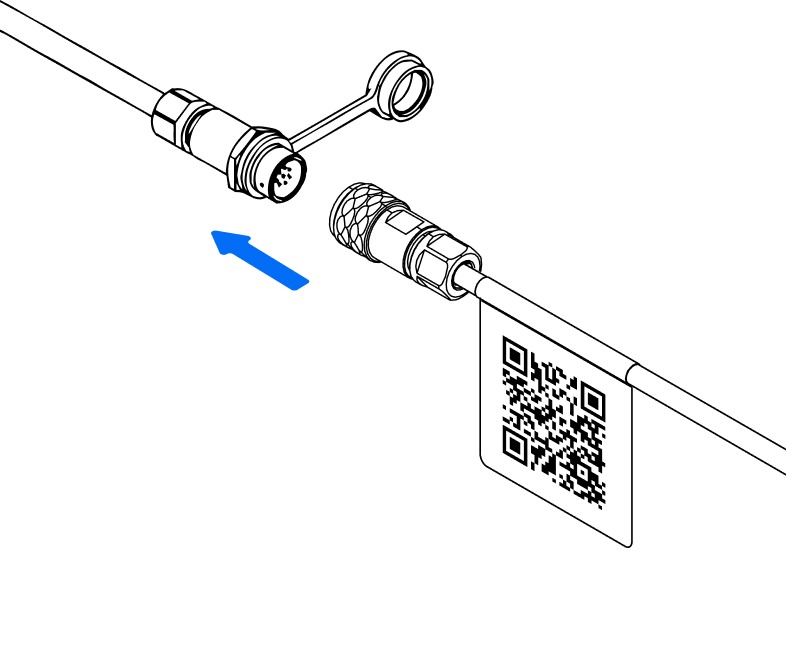
How to Connect
- Align the red dots on the Thermal Tail and the device connector.
- Push the connector firmly into place.
- You will hear an audible click when the sensor is fully connected.
⚠️ Important: Do not twist the tail while pushing or pulling as this may damage the pins on the connector.
Once your sensor and tail are registered, you can view each monitoring point in the app.
For multi-probe tails, the probe closest to the sensor is shown as Probe 1. Additional probes appear in the app based on their distance from the connector.
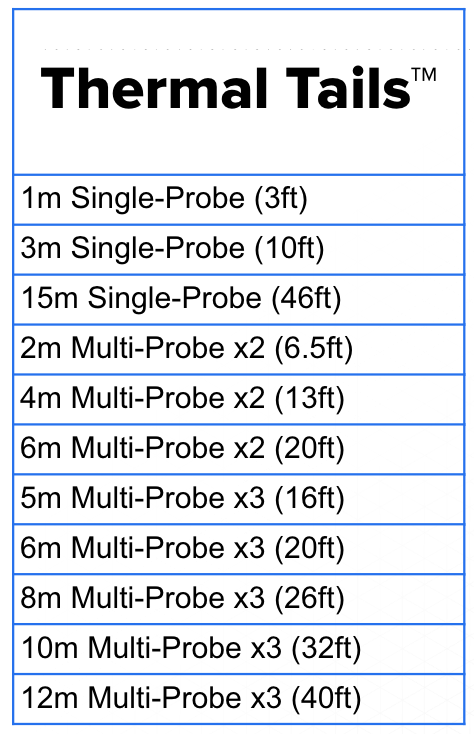
Available Tail Options
We offer a wide variety of tail lengths and probe configurations to suit different use cases.
Need Further Help?
Contact our support team help@converge.io or refer to the related articles in the Help Centre.